



Beyond the technical details, here is a deeper insight: our brains remember what we act on quickly, more so than what we store for later. When someone taps your card and takes an action right away, you lock in memory, you lock in value. Smart business cards don’t just share details, they prompt an immediate small action—and that action strengthens recall.

When you pull out a clean, branded smart business card, someone sees more than your name. They see you are up-to-date, professional and thinking ahead. Psychology tells us that trust builds when someone feels the exchange was easy and modern. With smart business cards you skip old bulk paper cards and give an experience that says “I’ve done this before”.
Paper business cards get lost, mixed up or tossed.
If your info changes (job title, phone number), you waste money reprinting.
Handing a card still relies on the other person typing your details manually or mis-spelling them.
Here is a simple flow for how smart business cards work when you use them:
You hand over your smart business card or send a link.
The recipient taps or scans it.
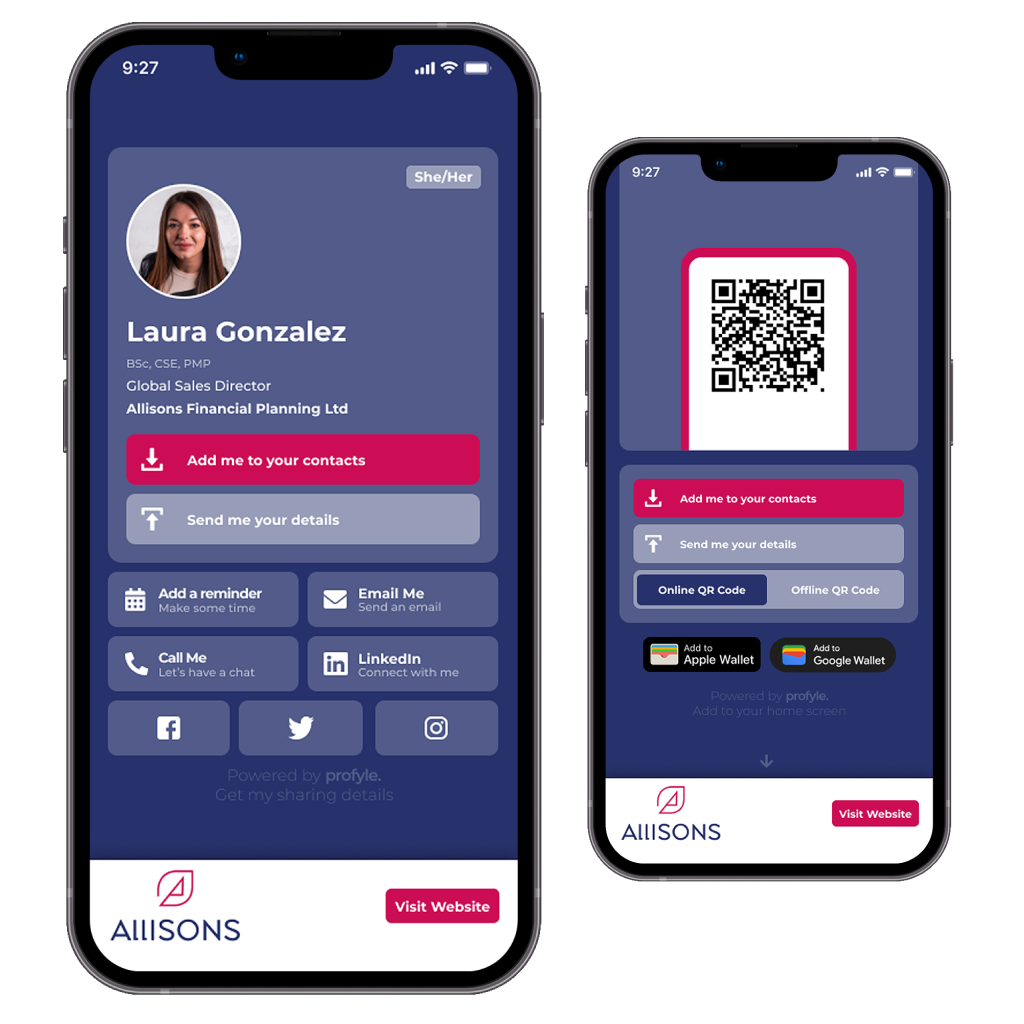
Their phone opens your digital profile: name, job, photo, buttons.
They tap one key action: save contact, message, book a call.
Their phone holds your info. You track or follow up.
You update your profile later if needed. You don’t print new cards.
Because the path from meeting to contact is short, smart business cards increase the chance you will be kept in mind and connected to.
If the recipient has to type your name, check spelling, open apps, they might skip it.
A smooth, single action builds trust: you look professional and ready.
These small details reflect deep behavioural principles: you make it easier for the other person so they are more likely to act.
Some Android phones have NFC switched off by default. In such cases, a QR fallback matters.
The NFC chip doesn’t need a battery. It is powered by the phone’s magnetic field.
Because the link part is hosted online, you can update your contact details without changing the physical card. That means smart business cards stay usable longer and adapt as you change roles or details.
There are security considerations. NFC works only in very close range, which reduces unwanted scanning.
With smart business cards you are only as strong as your weakest link in the chain of sharing → saving → follow-up. If the recipient’s phone does not read NFC, if the link loads slowly, if the page is cluttered or the save button hidden, your moment breaks.
You go from “That was a good meeting” to “I hope they remembered me”. Profyle focuses on reducing those weak links. Tap works on many phones, QR code is the fallback, link works too. The profile loads fast. The key button is clear. Branding looks professional. Follow-up paths are built in.
When you use a tool like this you shift from hoping for leads, to tracking and nurturing them.
One quick setup at your desk can turn into hundreds of effective connections later. If you follow this path, your smart business cards will be ready before your next meeting.
Go to the Profyle website and register. You’ll create a free account and start your 45-day free trial. No card purchase needed immediately.
By doing this you reduce risk. You test the system before committing money. This is an influence trigger: you give first, they feel safe to engage.
Once you’re in, fill in:
Your name and job title
Your phone number and email
Your company or brand name
Links to your website or portfolio
Smart business cards work best when the details are accurate and concise. You want someone to recognise you and act fast.
Choose your colours, upload your logo or photo, pick the layout. Make sure your look matches your brand style. Then decide what content you include: LinkedIn, Instagram, portfolio, testimonial links.
By personalising the card you trigger the “liking” principle: people connect more when they feel your card reflects you.
On your card choose one key action button:
Save contact
Message me
Book a call
This simplifies choice. With fewer options people decide faster. That aligns with value-pricing ideas: clarity boosts action.
Profyle supports:
NFC physical card that taps phones
QR code that people scan
A link you share by text or email
This means your smart business cards adapt to every meeting. If someone’s phone doesn’t support NFC, they can scan the QR code.
Hand your card (or link) to a friend or colleague. Ask them:
Did the profile open fast?
Was the call to action clear?
Could they save your contact easily?
If one step feels clunky, fix it. The minor friction kills many smart business cards before they get used.
If you prefer to have a physical card with NFC chip, order one. Or you can skip it and share just digitally. With Profyle you can still use their platform even if you skip printed cards. This offers flexibility and helps budget-wise.
Keep your smart business cards ready: in your wallet, phone case or attach it to key items. When you meet someone say: “Here’s my card, just tap or scan” and let them do the action. Because you set it up clearly, the other person acts quickly. That single moment locks in memory.
When your phone changes, job shifts or you get a new project, log back into Profyle and update your profile. Your smart business cards reflect updates instantly—no reprints. Keeping details fresh reinforces trust and keeps you relevant.
If you hand someone a card you expect them to act, but often they don’t. When you use a true smart business card tool the chances go up.
You save time. You skip wasteful printing. You build an experience that feels modern and polished, and that reflects well on you.
Ultimately, the best smart business cards are about trust, ease and follow-through. With Profyle you get all three. Start your free Profyle Card account here.