

Connect Your Team.
Linked Profyles.
Link to colleagues, assistants, or alternates. Add labels and notes so contacts always know who to reach - and why.
Enable connections across your organisation.

One tap to the right person
Contacts can see and reach your colleagues directly from your profile. No “let me forward this” emails. No missed introductions. The right person is always one tap away.
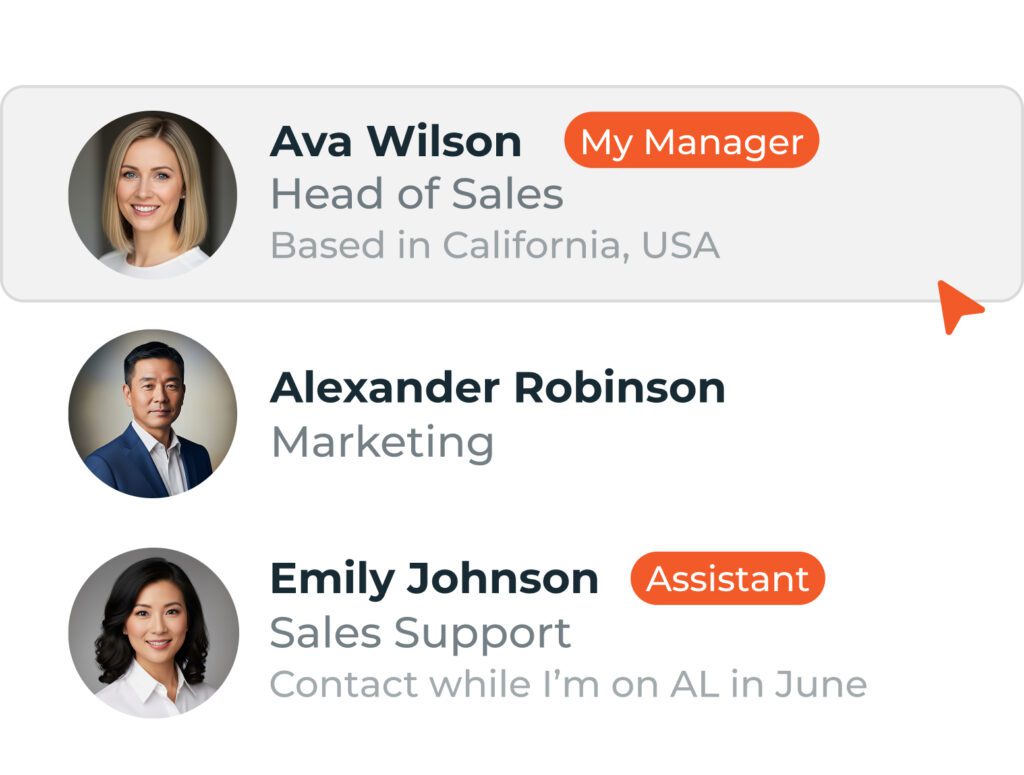
Context that travels with the link
Add labels like “Assistant” or “Covering for” so contacts understand the relationship at a glance. Include notes with extra detail – “Available while I’m on parental leave” – and contacts know exactly who to reach and why.

Coverage when you're unavailable
Going on leave? On site for a month? Link to whoever’s covering and contacts won’t hit a dead end. They’ll find the right person without chasing you.
Link Profiles. Add context. Stay connected.
Linked Profyles lets you connect your profile to colleagues, assistants, or anyone else contacts might need to reach. Labels and notes make relationships clear - so contacts always know who they're looking at and why they're listed.
Flexible Linking
Connect the people who matter.
- Link to specific individuals or entire teams
- Choose who appears on your profile
- Configure links at group level or person by person
- Show as many or as few connections as needed
- Organise by role, department, location, or however makes sense


Labels and Notes
Make it effortless for prospects to find and connect with the right expertise.
- Add a label to describe the relationship: “Assistant”, “Manager”, “Covering for”
- Include a note with extra context: “Contact for diary scheduling” or “Available until March”
- Labels appear as badges on your public profile
- Notes display below the linked person’s name
- Update labels and notes any time – changes appear instantly
Consistent Brand Presence
Same quality experience, whoever they find.
- Linked profiles share your organisation’s branding
- Company information displays consistently
- Contacts get a polished experience regardless of entry point
- Centralised control keeps everything on-brand

How teams use Linked Profyles.
-
Executive CoverageE.g. Executive Assistant
Handles my diary and all scheduling -
Parental LeaveE,g, Covering
Contact until September 2026 -
Team IntroductionsE.g. Line Manager
“For escalations or approvals” -
Specialist ReferalsE.g. Colleague
“Our residential property expert” -
Key Account TeamsE.g. Account Director
“Lead contact for FMCG clients”
Ready to connect your team?
Join thousands of teams who've already transformed how they connect and share information.
Frequently asked questions.
How do labels and notes appear to contacts?
Labels show as a badge next to the linked person’s name on your public profile. Notes appear below, giving contacts the context they need.
Can I update labels and notes after setting them?
Yes. Edit them any time from your profile or the admin portal. Changes appear immediately.
Can I link to people outside my organisation?
Currently, Linked Profyles connects people within the same organisation. For external referrals, you can share a colleague’s profile link directly.
Do linked people get notified when I add them?
No automatic notification is sent. You control who appears on your profile, and they control who appears on theirs.
Can I link to a whole team or department?
Yes. Admins can configure group-level linking so everyone in a team automatically shows relevant colleagues. Or you can set links individually.
What happens if a linked person leaves the company?
When someone is removed from your organisation, they’re automatically unlinked from all profiles. No manual cleanup needed.
Is there a limit to how many people I can link?
There’s no hard limit, but we recommend keeping it practical. Five to ten links typically works well – enough to be useful without overwhelming contacts.
Can contacts see the notes I add?
Yes. Notes are visible on your public profile, so write them for your contacts’ benefit. Keep them helpful and professional.