Introduction
AI Enrich is a powerful new feature in Profyle Card that automatically fills in missing contact details when you capture a new introduction. Instead of manually entering or looking up a contact’s job title, company, or LinkedIn profile, AI Enrich does the work for you — using just an email address to populate the rest.
With AI Enrich enabled, it’s possible for your Introductions form to be configured to only collect an email address — making capturing introductions faster than ever before.
AI Enrich is currently available as a beta feature and operates on a credit-based system managed by your Profyle Card account team.
How It Works
- A new introduction is captured — whether from a Profyle Card tap, QR scan, business card upload or manually
- AI Enrich checks the email address — if the introduction includes a valid email and has missing contact fields, enrichment is triggered automatically in the background.
- Missing details are filled in — within moments, any empty fields are populated with data sourced from publicly available professional information. Existing data you’ve already captured is never overwritten.
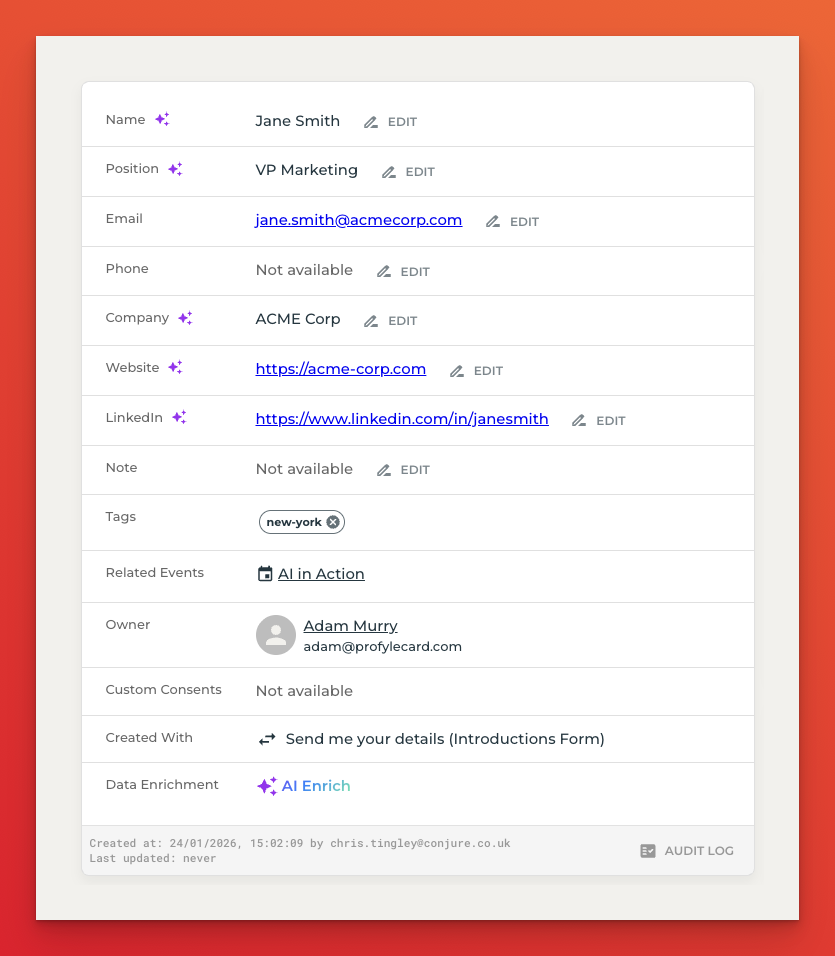
- Enriched fields are clearly marked — a purple AI icon appears next to any field that was populated by AI Enrich, so you always know the source of your data.
What Data Is Enriched
Using just an email address, AI Enrich can automatically populate the following fields:
| Field | Example |
|---|---|
| Name | Jane Smith |
| Job Title | VP of Marketing |
| Company | Acme Corp |
| Company Website | www.acmecorp.com |
| LinkedIn Profile | linkedin.com/in/janesmith |
Only fields that are empty at the time of enrichment are updated. Any information you have already captured is preserved as-is.
The following screenshot shows an example of an enriched contact:
How to Enable
- Contact your Profyle Card account manager to have AI Enrich made available for your organisation
- Navigate to Settings → Introductions in the Profyle Card portal.
- Toggle on “AI Enrich (Beta)” — this option appears once the feature has been made available for your organisation. Note: the Introductions feature must be enabled first.
- Monitor your credits — your remaining credit balance is displayed directly below the toggle, and a full purchase history is available on the Billing page.
Once enabled, AI Enrich runs automatically on every new introduction that includes an email address. No further action is required from your team.